

Verified / Official
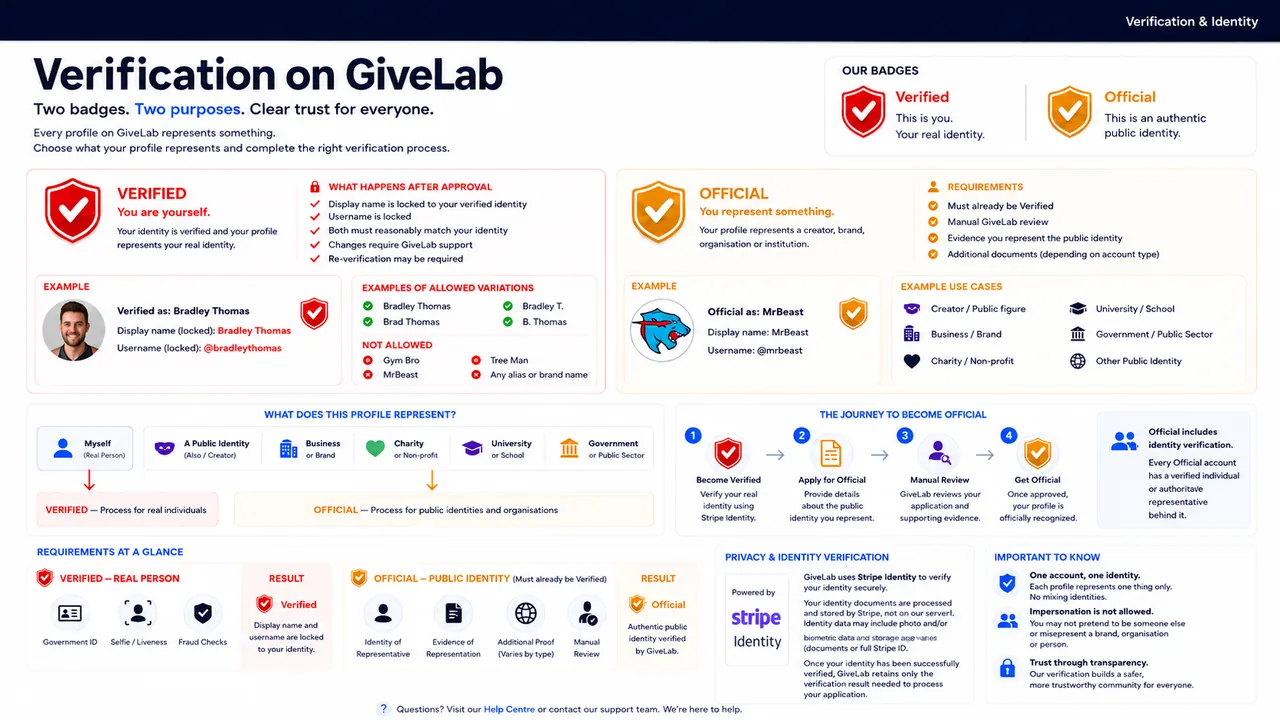
Build Trust with Verified and Official Badges
GiveLab offers two levels of profile verification designed to help creators, brands, businesses and organisations establish trust and authenticity across the platform.
Each badge serves a different purpose and has its own verification process.
Verified Creator Badge
The Verified Creator Badge confirms that the identity behind a GiveLab account has been successfully verified and that the account has an active Verified Creator subscription.
How to Get Verified
Click Get Verified on your profile.
Start your monthly Verified Creator subscription through Stripe.
Complete the required identity verification through Stripe Identity.
Once your identity has been successfully verified and your subscription is active, the Verified Creator Badge will be added to your profile.
Click Get Verified on your profile.
Start your monthly Verified Creator subscription through Stripe.
Complete the required identity verification through Stripe Identity.
Once your identity has been successfully verified and your subscription is active, the Verified Creator Badge will be added to your profile.
Verified Creator Benefits
Verified Creators may receive additional trust, visibility and platform features, including:
A Verified Creator Badge displayed on their profile and campaigns.
Priority consideration in GiveLab feed and discovery rankings.
Increased visibility across relevant GiveLab discovery surfaces.
Access to features reserved for Verified Creators.
Eligibility to apply for an Official Profile Badge.
Priority ranking does not guarantee a specific position in the feed. GiveLab may also consider campaign relevance, quality, freshness, engagement, safety signals and other ranking factors.
What Happens if Your Subscription Ends?
If your subscription is cancelled, expires or becomes inactive because of a failed payment, your Verified Creator Badge and associated Verified benefits will be removed until your subscription is active again.
In some circumstances, GiveLab may require identity verification to be completed again when verification is reactivated.
Official Profile Badge
The Official Profile Badge provides an additional level of verification for creators, public figures, brands, businesses, organisations and accounts operating under recognised professional names or aliases.
Unlike the standard Verified Creator process, Official Profile applications are manually reviewed by the GiveLab team.
The purpose of the Official Profile Badge is to confirm that the account genuinely represents the person, brand, business, organisation or identity it claims to represent.
Eligibility
- Before applying for an Official Profile Badge, you must already have an active Verified Creator Badge.
- Required Documents
- The documentation required will depend on the type of account being verified.
- Individuals
- You may be asked to provide:
The front of a valid government-issued ID card or passport.
The back of your ID card, where applicable.
A selfie while holding your identification or other requested identity evidence.
- Brands, Businesses and Organisations
- You may be asked to provide documentation demonstrating that you own, represent or are authorised to act on behalf of the claimed entity.
The front of a valid government-issued ID card or passport.
The back of your ID card, where applicable.
A selfie while holding your identification or other requested identity evidence.
This may include:
Company or business registration documents.
Company extracts.
Evidence of your role within the organisation.
Official business documentation.
Other supporting evidence requested by GiveLab.
Professional Names or Aliases
If your public identity differs from your legal name, GiveLab may request evidence connecting you with the professional name, creator identity or alias you are claiming.
Review Process
After submitting your Official Profile application:
Your application will be manually reviewed by the GiveLab verification team.
Your application will display as Pending while it is being reviewed.
GiveLab may request additional information if required.
Once the review is complete, your application will either be approved or rejected.
If Your Application Is Approved
Your account will receive the Official Profile Badge, indicating that GiveLab has manually reviewed the account and confirmed its connection to the identity, brand, business or organisation being represented.
If Your Application Is Rejected
If your application cannot be approved:
You will receive the reason for the rejection.
Verification documents associated with the rejected application will be permanently deleted from GiveLab's storage.
You may correct the issue and submit a new application.
Badge Levels
| Badge | What It Means | How to Get It |
|---|---|---|
| Verified Creator | Confirms that the account holder has completed identity verification and has an active Verified Creator subscription. | Subscribe and successfully complete Stripe Identity verification. |
| Official Profile | Confirms that GiveLab has manually reviewed evidence connecting the account to the person, brand, business, organisation or identity it represents. | Maintain an active Verified Creator subscription and submit an Official Profile application. |
Frequently Asked Questions
Do I need to be a Verified Creator before applying for an Official Profile Badge?
Yes. You must have an active Verified Creator Badge before you can apply for an Official Profile Badge.
Does paying for Verified automatically give me the badge?
No. Your subscription must be active and you must successfully complete the required identity verification before the Verified Creator Badge is issued.
Do Verified Creators receive better feed visibility?
Verified Creators do receive priority consideration in GiveLab feed and discovery rankings.
Verification does not guarantee a specific position. GiveLab may also consider relevance, campaign quality, freshness, engagement, safety signals and other factors when determining what content appears in feeds and discovery.
How long does an Official Profile review take?
Official Profile applications are manually reviewed by the GiveLab team. Processing times may vary depending on application volume and whether additional information is required.
Is my personal information secure?
Verification information is used for the purpose of completing the verification process and is handled securely.
Documents submitted directly to GiveLab as part of a rejected Official Profile application are permanently removed from storage after the application is rejected.
Can I apply again after being rejected?
Yes. You can review the rejection reason, correct the issue and submit a new application.
What happens if my Verified Creator subscription ends?
Your Verified Creator Badge and associated Verified benefits will be removed while your subscription is inactive.
What happens to my Official Profile Badge if my Verified Creator subscription ends?
Because an active Verified Creator subscription is required for Official status, your Official Profile benefits may become inactive if your Verified Creator subscription is no longer active.
Can an Official Profile Badge be revoked?
Yes. GiveLab may revoke an Official Profile Badge if the account no longer meets the requirements for Official status, if the verification is found to be inaccurate or misleading, or if the account violates applicable GiveLab policies.
If Official status is revoked but your Verified Creator subscription remains active and your identity verification remains valid, your account may return to standard Verified Creator status.